Welcome to AeroHub OpenAPI Document
Description:
AeroHub OpenAPI Specification is an API standard for channel partners, hereafter referred to as “shop,” to implement the flight booking process.
AeroHub defines an unified API that allows shop to customize their integration based on various business needs. Shop have the option to use the TechHub product to establish direct connections with airlines and access their original fares, or they can choose to use the FareMarket product to obtain the lowest fares offered by suppliers.
- FareMarket offers the lowest fares aggregated from suppliers.
- TechHub provides official airline content from API connection and website.
- TechHub+ enables direct connections with airlines to access original fares.
Product:
1. FareMarket
Shop can obtain the lowest fare and ancillary options from AeroHub suppliers.
2. TechHub
TechHub provides airline content aggregated from official airline sources, including airline APIs and airline website, ensuring accuracy and consistency with airline-standard products.
Through TechHub, shops can access airlines’ core products such as fares for different passenger types (Adult, Child, Infant) and ancillary services including baggage options, seat selection, and other airline-provided services.
The airline integrations and accounts are managed by the Letsfly group. Shops do not need to establish direct commercial agreements with airlines. Instead, settlement and after-sales services are handled by AeroHub.
3. Techhub+
TechHub+ is an airline API aggregation product that integrates multiple airline APIs and provides access to airlines’ original content through a unified interface.
Shops can retrieve fares for different passenger types (Adult, Child, Infant) and access ancillary services such as checked baggage, cabin baggage, priority boarding, and seat selection.
Integration Process
- Shop needs to submit white IP list, apply test API Key
- Develop in sandbox environment
- Complete testing case at sandbox, apply production API Key
- Stage test at production environment and go live
Notice:
- Please use HTTP/HTTPS protocol to access AeroHub OpenAPI, charset: UTF-8.
- Please set Content-Type in HTTP Header to “text/plain”.
- Please post your data via HTTP POST method to AeroHub OpenAPI, data format must be in JSON format.
Signature:
Encrypt data based on a key using either the ‘AES256/CBC/PKCS5Padding’ or ‘AES256/CBC/PKCS7Padding’ encryption algorithm. If API access is enabled, you can retrieve the API ‘key’ and ‘secret’ from the Letsfly system, or request this information from your Letsfly business manager.
For instance, if your key and secret data are:
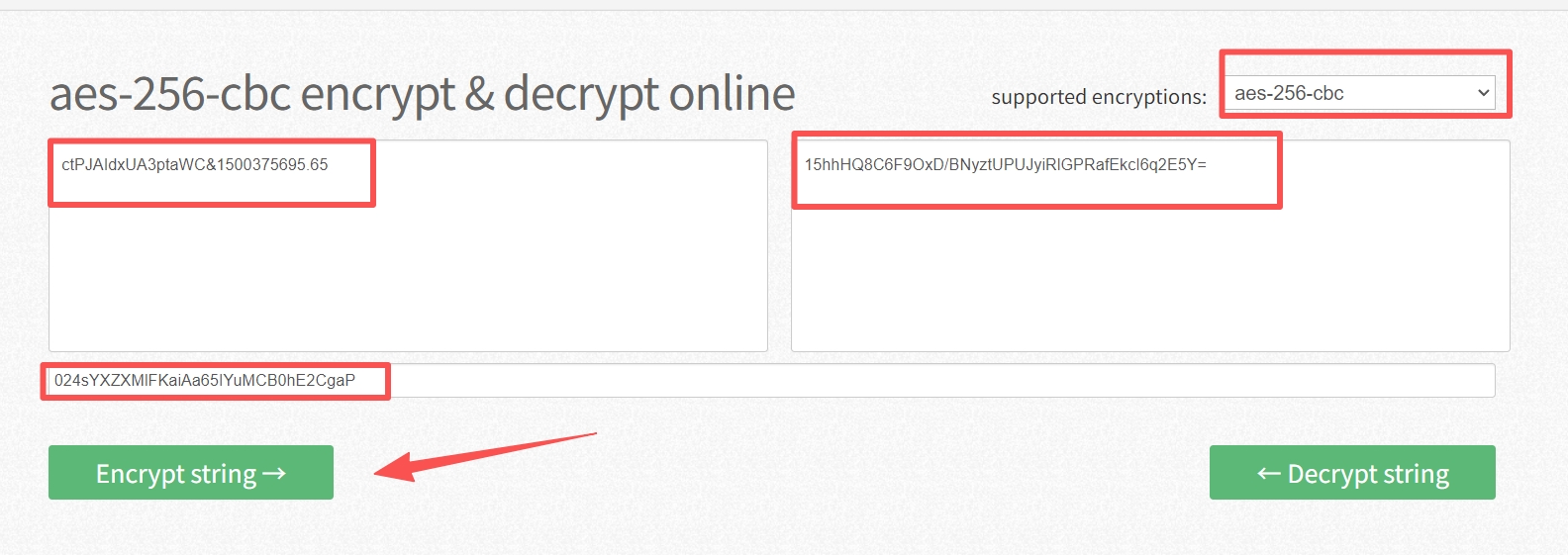
Key: ctPJAIdxUA3ptaWC
Secret: 024sYXZXMlFKaiAa65IYuMCB0hE2CgaPThe raw data should be formatted as ‘key×tamp’, such as ‘ctPJAIdxUA3ptaWC&1500375695.65’. After encrypting the raw data with the provided secret, the corresponding encrypted string would be ‘15hhHQ8C6F9OxD/BNyztUPUJyiRlGPRafEkcI6q2E5Y=’.
You can verify the encryption process at this site: https://encode-decode.com/aes-256-cbc-encrypt-online/
Environment:
| Environment | API | HTTPS request address |
|---|---|---|
| Sandbox | All | https://sandbox.aerohubtech.com |
| Production | GetAvailability | https://openapi-search.aerohubtech.com |
| Other | https://openapi.aerohubtech.com |
- Note: In the Production Environment, errors will occur if an API request is made with an incorrect address.
API structure:
AeroHub Open API has 5 types API including booking process, order related, payment, add-on service and seat selection, shop can integrate specific API according to different business cases.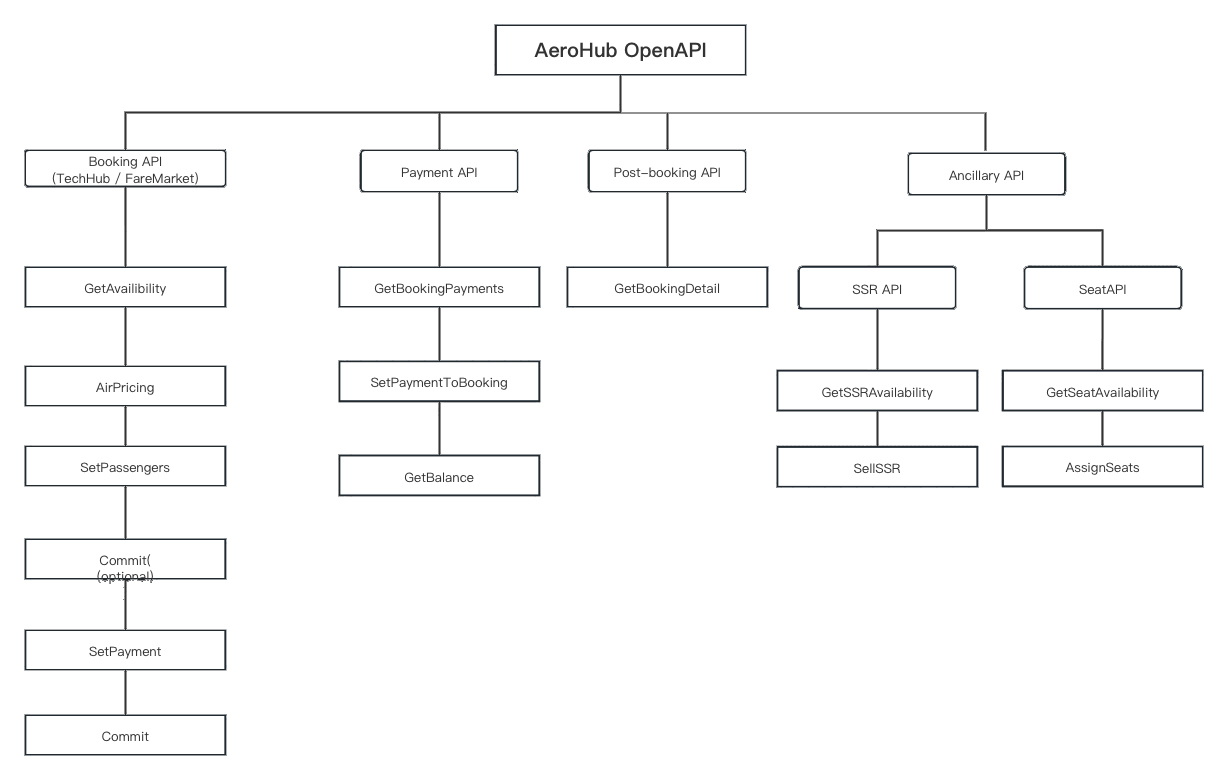
Last editor:AeroHub Update time:2026-10-20 11:49