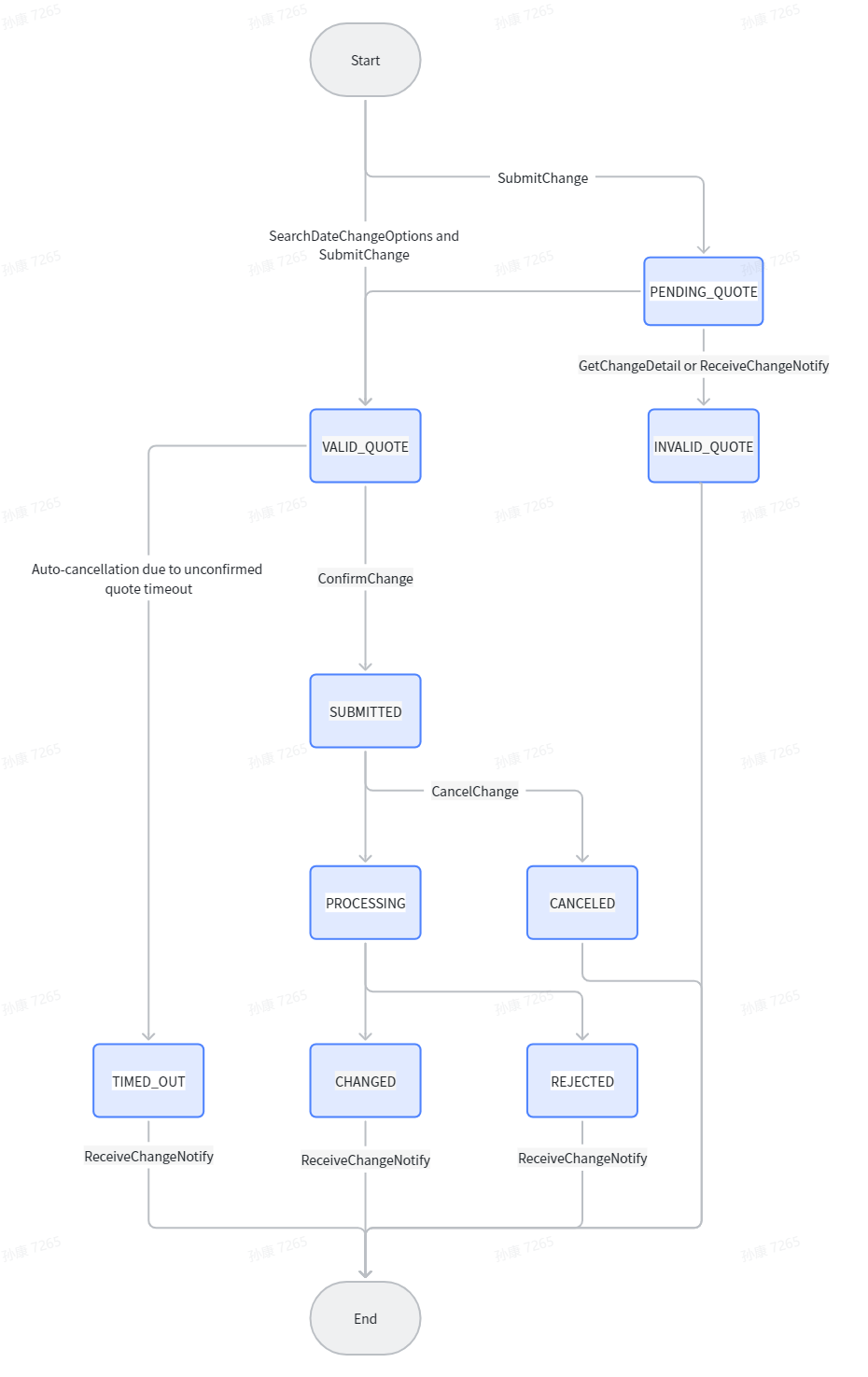
Change Status Flowchart (Self-service Flow + Original Workflow)
1. How to Quote Change Fares Before Confirming a Change Request
- Optional Self-service Search Step:
- For partners using the self-service date change flow, use [SearchDateChangeOptions] to retrieve available flight options and pricing for the selected passengers, segments, and date.
- The partner may then select one option using [searchId + routingKey + fareKey].
- Submit a Change Request for Quote:
- Use [SubmitChange] to submit your modification details (itinerary or passenger information).
- If [SearchDateChangeOptions] was used, submit the selected [searchId + routingKey + fareKey] together with the updated segments.
- If [SearchDateChangeOptions] was not used, partners may still submit the change request directly using the original pricing / quotation workflow.
- The system will generate a unique change identifier with [Change Status: PENDING_QUOTE].
- Retrieve and Verify Quote Results:
- Use [GetChangeDetail] to monitor the [Change Status].
- Confirm and Proceed:
- Once you receive a satisfactory quote, use [ConfirmChange] to accept the fares and proceed with payment (if applicable).
- This action will move the status to [Change Status: PROCESSING].
2. How to Manage and Track the Change Process
- Submit Supporting Documents:
- If the change requires identity verification (e.g., name correction), use [UploadAttachment] to upload the necessary documents files before [SubmitChange].
- Track Real-time Status:
- Continuously use [GetChangeDetail] to retrieve the latest status of your change request, from payment verification to final ticket reissuance.
- Cancel the Request:
- If you decide not to proceed, use [CancelChange].This is only invoked before [ConfirmChange]. Once the status reaches [PROCESSING] (sent to the airline), manual cancellation via API is no longer supported.
- Receive Final Notification:
- After the airline processes the change, the final result (Success/Fail/Timeout) will be pushed via [ReceiveChangeNotify].
Change Status Flowchart
Author:AeroHub Create time:2026-03-11 18:14
Last editor:AeroHub Update time:2026-07-08 17:23
Last editor:AeroHub Update time:2026-07-08 17:23